
Webhooks and HTTP requests
Receive requests from other systems on a workflow’s own URL, and call any API from a workflow.
Updated
Webhooks connect FlowWP to systems that are not WordPress plugins. A webhook trigger lets another system start a workflow; the HTTP Request step lets a workflow call another system.
Receive a webhook
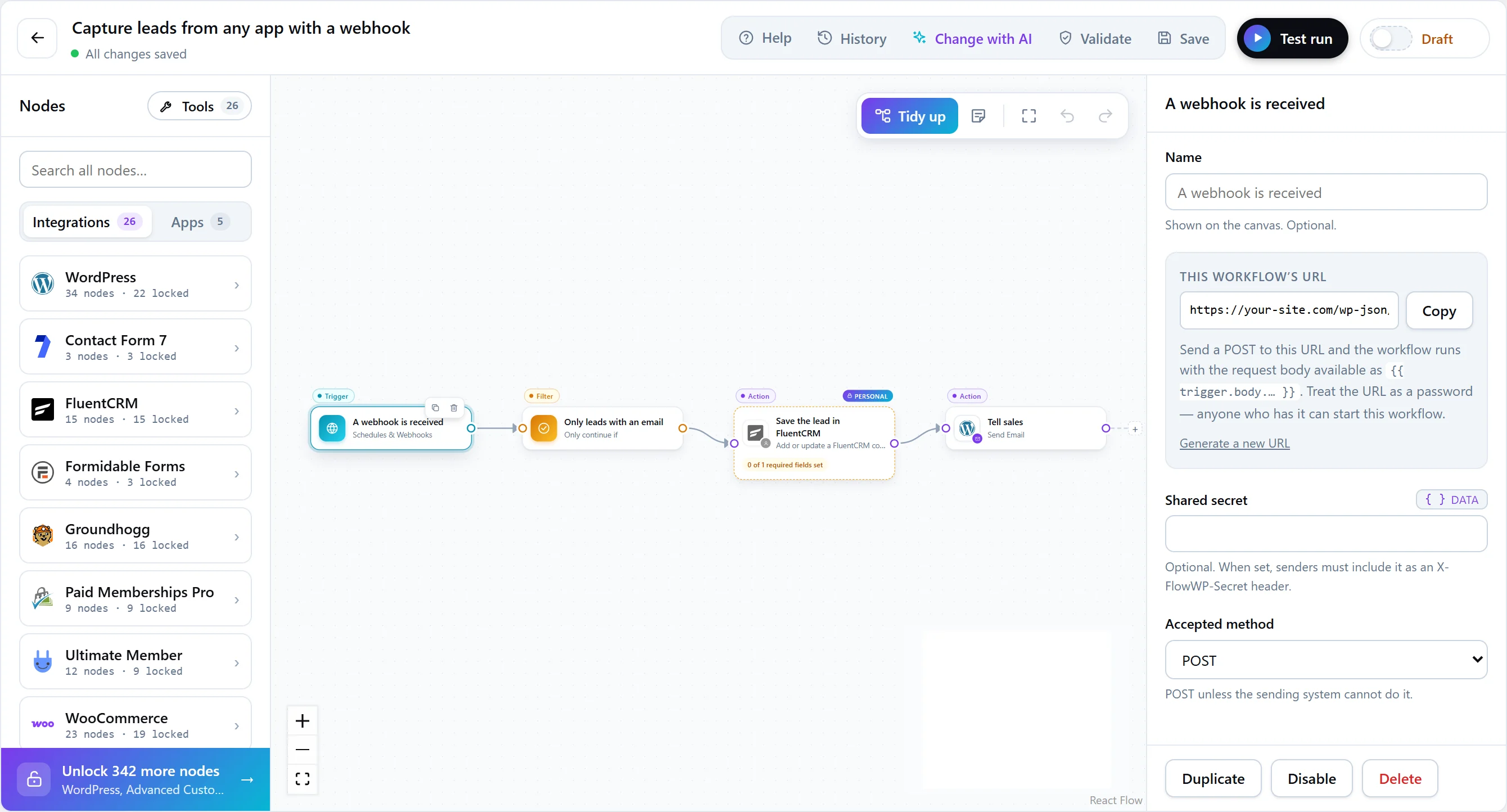
Add the A webhook is received trigger (in Schedules & Webhooks). It gives the workflow its own address:
https://your-site.com/wp-json/flowwp/v1/hooks/{key}| Setting | What it does |
|---|---|
| Webhook key | The unguessable part of the URL, generated for you. Treat it as a password: anyone with the URL can start the workflow. |
| Shared secret | Optional. When set, senders must include it in an X-FlowWP-Secret header, and requests without it are refused. |
| Accepted method | POST (the default), GET, or any. Use POST unless the sending system cannot. |
To try it from a terminal:
curl -X POST "https://your-site.com/wp-json/flowwp/v1/hooks/YOUR_KEY"
  -H "Content-Type: application/json"
  -H "X-FlowWP-Secret: YOUR_SECRET"
  -d '{"email": "jane@example.com", "plan": "pro"}'
What the sender gets back
- 202 Accepted as soon as the request is taken. The workflow runs in the background, so a slow workflow never makes the sender time out and retry.
- 404 for a wrong key, a workflow that is not active, or a plan that no longer includes webhooks — deliberately the same answer, so nobody can probe which keys exist.
- Request bodies are limited to 256 KB.
To answer with your own status code and body instead — an ID, a result, a redirect — add Respond to webhook (Business and above).
Using the request in later steps
| Token | Holds |
|---|---|
{{ trigger.body }} |
The request body; JSON fields can be reached by path, such as {{ trigger.body.email }}. |
{{ trigger.query }} |
The query string parameters. |
{{ trigger.headers }} |
The request headers. |
{{ trigger.method }} |
The HTTP method. |
{{ trigger.ip }} |
The sender’s IP address. |
Every plan, Free included, can have as many webhook workflows as you need.
Call an API with HTTP Request
The HTTP Request step calls any URL and passes the response to later steps.
| Setting | What it does |
|---|---|
| URL | The address to call. It can include tokens. |
| Method | GET, POST, PUT, PATCH or DELETE. |
| Body | Sent as-is. Use tokens to insert workflow data, and the | json filter to escape a value inside a JSON body. |
| Headers | One per line, as Name: value. |
| Timeout | Seconds to wait for an answer; 15 by default. |
Later steps can use status (the HTTP status), body (the response body) and json (the body decoded as JSON) from the step’s output, such as {{ nodes.crm.output.json.id }}.
Good to know
- Private addresses are blocked. Every URL is checked right before the request is made, after resolving its hostname: private, loopback and link-local addresses — including cloud metadata addresses — are refused. A developer can allow a specific internal host with the
flowwp_http_allowed_hostsfilter. - Test runs send GET requests for real. Other methods are rehearsed: the step reports what it would have sent.
- It is not retried automatically. FlowWP cannot know whether the other system treats a repeated request as harmless, so an HTTP Request is treated as unsafe to repeat.